Azvian Knowledge Base
A help center and documentation site you host yourself.
Azvian Knowledge Base is a help center you run on your own hosting, not a monthly subscription to someone else's. Write articles in Markdown, group them into topics, and publish a clean, searchable site your customers can read without signing in. See what people searched for and couldn't find, and which articles didn't help, so you know what to write or fix next. Keep a private playbook for your team in the same place.
The real thing, not a mock-up
Screenshots of the actual product, filled with sample data for a made-up company.
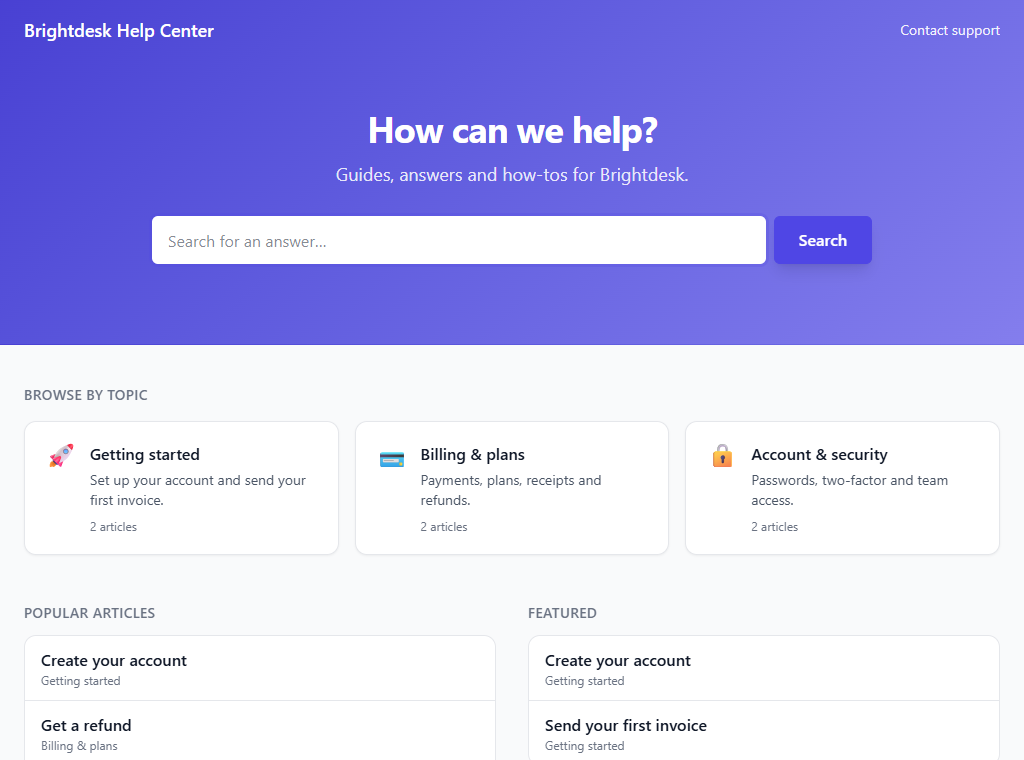
A help center your customers can find their way around
A search box, your topics, the most read articles and the ones you want to feature. It uses your name, your headline and your accent colour, on your own domain.
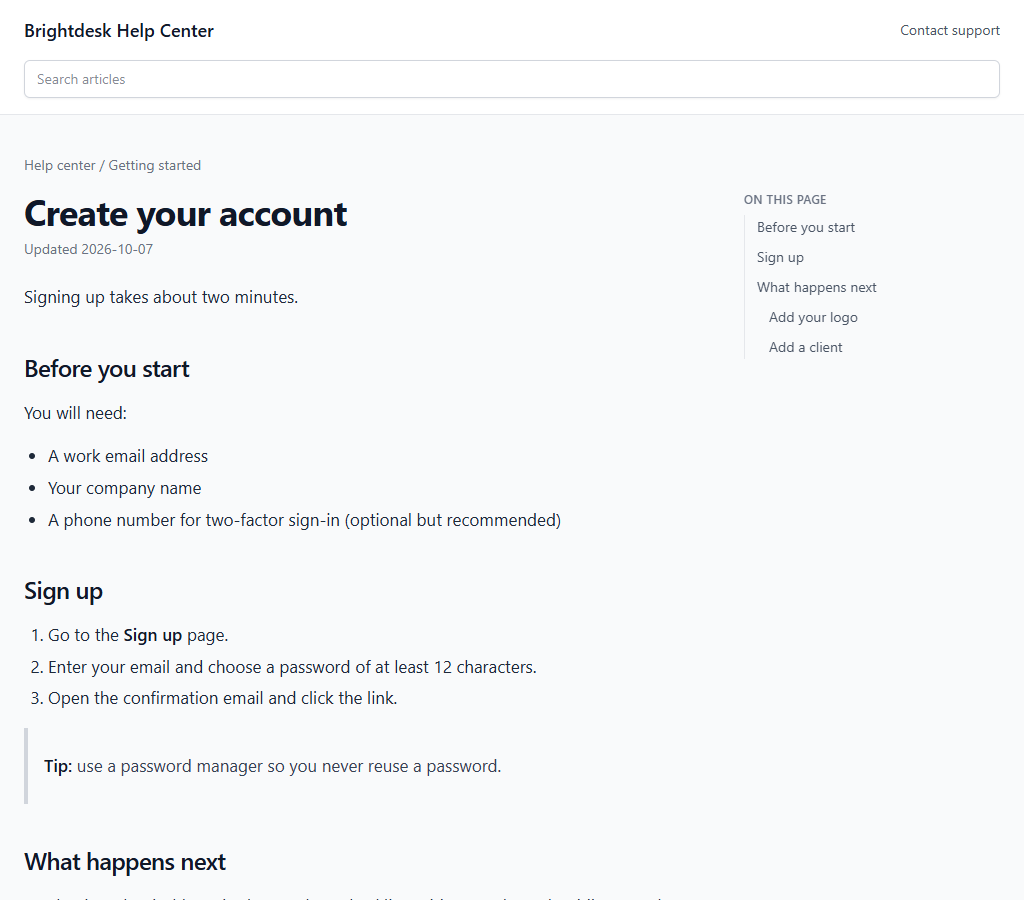
Articles that are easy to read and to link to
A contents list is built from the headings, and every heading has its own link, so you can point someone at the exact section. Below each article are related articles and a 'Was this article helpful?' question.
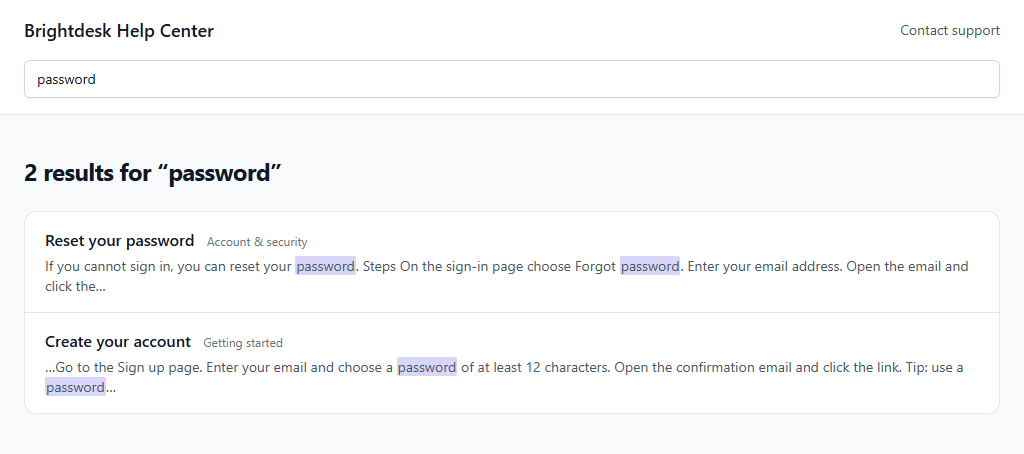
Search that needs no search server
Every word must appear, matches in the title count most, and the matching words are highlighted in a short excerpt. It runs on your own database, so it works the same on any host.
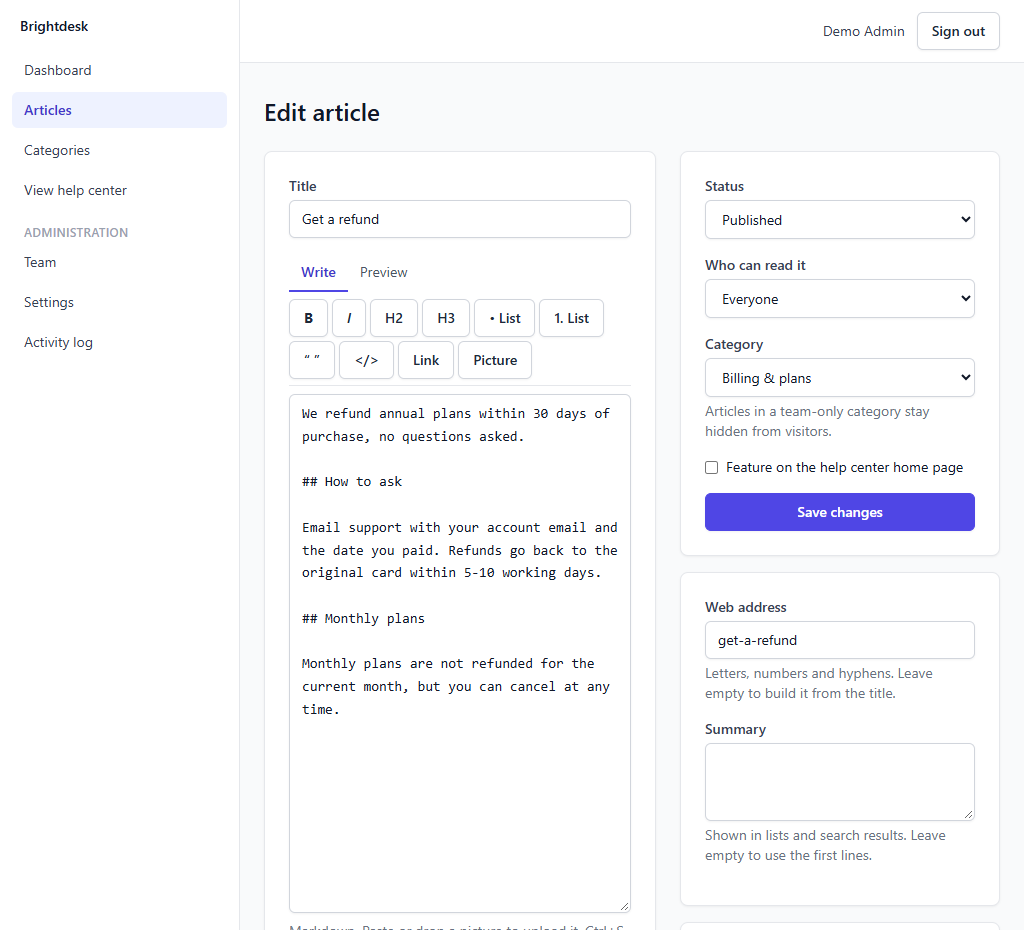
Write in Markdown, with a toolbar if you prefer
Bold, headings, lists, links and code are one click each. Paste or drop a picture to upload it, check the result on the Preview tab, and keep an article as a draft until you publish it. Ctrl+S saves.
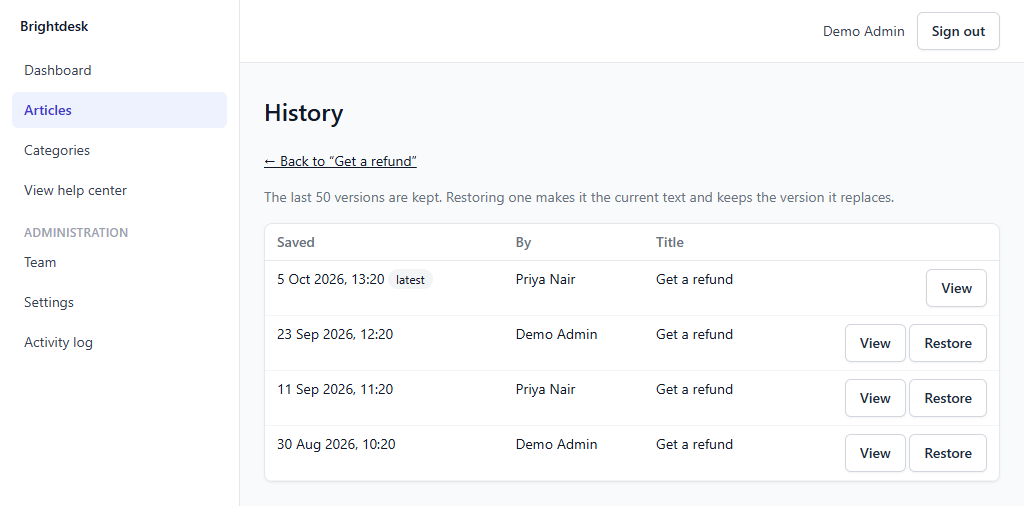
Every change is kept, and can be undone
Each time the title or text changes, the previous version is kept. View any of the last 50 versions and restore it, and the version it replaces is kept too.
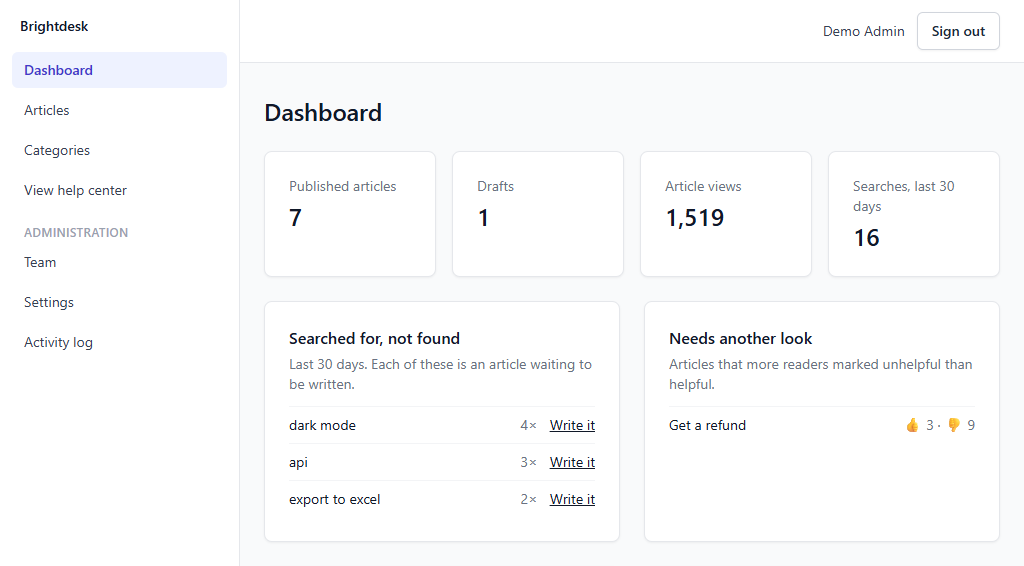
Know what to write next
Searches that found nothing in the last 30 days, each with a button that starts an article with that title, and the articles more readers marked unhelpful than helpful.
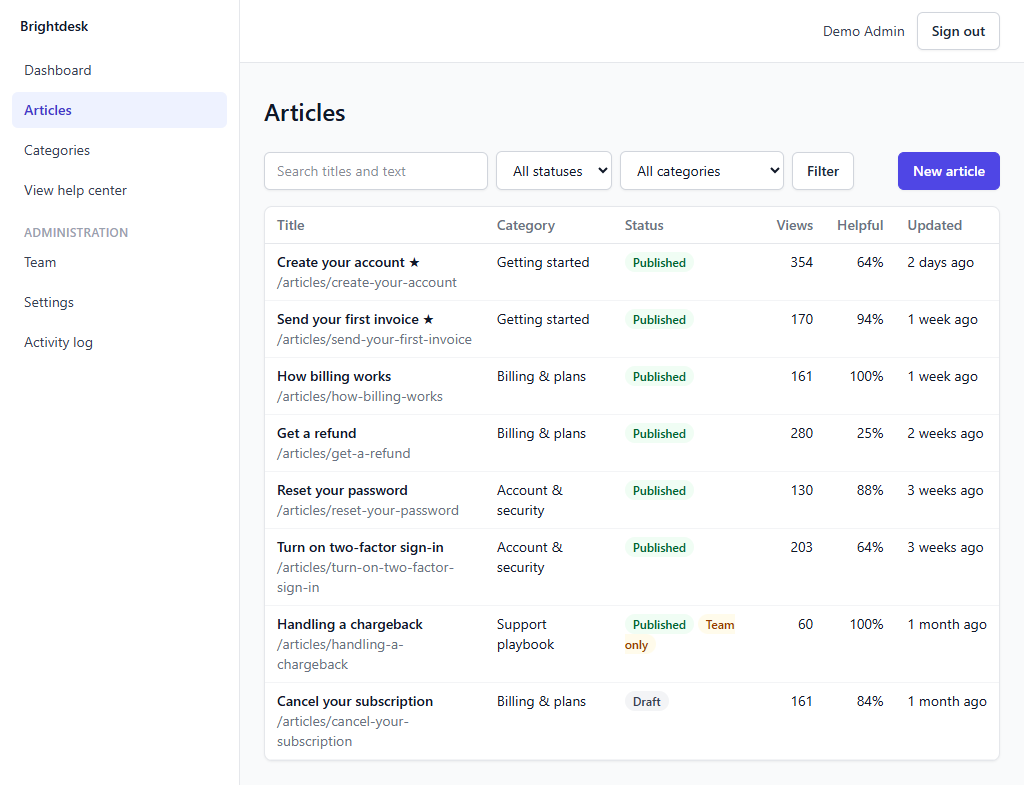
Public articles and a private playbook, side by side
Mark an article, or a whole category, for signed-in team members only. Visitors get a 'not found' page and it never appears in search or the sitemap.
Highlights
Safe to publish
Articles are converted from Markdown on your server. Raw HTML is dropped and dangerous links are refused, so nobody on the team can publish a script by accident. Uploaded pictures are checked by their contents, and SVG files are refused.
Findable by search engines
Clean addresses, a sitemap and robots file that update themselves, and a canonical link on every article. Prefer to stay private? One switch keeps the whole help center out of search engines.
Honest numbers
Views and helpful votes count readers, not search-engine robots or your own team. Each reader can answer once per article per day, and visitors are told apart by a daily fingerprint rather than anything that identifies them.
Internal and public in one place
Keep a support playbook, a refund policy or onboarding notes visible only to people who are signed in, next to the public articles customers see.
Your content, your database
Articles, versions and pictures live on your own hosting. Deleting a category keeps its articles. The text is plain Markdown, so you are never locked in.
Runs on ordinary hosting
Built for cPanel, Plesk and DirectAdmin style hosting: a web installer, no command line, and no background process to keep alive. One cron job every minute is all it asks for.
$39, one time. No subscription. You get the download and a license key for one site, by email. Buying is through Gumroad, which adds any VAT, GST or sales tax that applies where you live.
Questions
How do I buy it, and what do I get?
You buy through Gumroad, which takes the payment and adds any VAT, GST or sales tax that applies where you are. Gumroad gives you the download, and we email you your license key straight away. Install it, then paste the key into Settings, License in the app. One key works on one site.
Is there a refund?
Our refund policy applies: if the product does not work as this page describes, email hello@azvian.com with your order number within 14 days and we will either fix the problem or refund the purchase. The details are on the refund policy page.
Do my customers need to sign in to read it?
No. The help center is public. Only the team signs in, to write articles and see the dashboard. Articles and categories you mark as team only are hidden from everyone else.
Is there a visual editor, or do I have to use Markdown?
Articles are written in Markdown, with a toolbar for the common things (bold, headings, lists, links, code, pictures) and a preview tab. There is no drag-and-drop page builder.
How good is the search?
It finds articles containing every word you type, ranks title matches first and highlights the words in an excerpt. It doesn't correct spelling or understand synonyms, and it is meant for hundreds to a few thousand articles, which is far more than most help centers have.
Can it be in more than one language?
Not in this first version. You can write the articles in any language, but there is no switcher between translations of the same article.
Can customers leave comments or open tickets?
No. Readers can say whether an article helped, and you can show a 'Contact support' link on every page that goes to your own contact page or email address. It isn't a helpdesk.
Can I import articles from another help center?
Not yet. Because articles are Markdown, they can be pasted in one at a time. A bulk import is on the list for a later version.
What do I need to run it?
A web host with PHP 8.2 or newer, a MySQL or MariaDB database (SQLite works for small installs), an email account for sending team invitations, and a cron job that runs every minute. A browser-based installer checks your server and sets everything up.
What happens if I don't have a licence?
The software keeps working. A licence covers updates and support.
Have a question about Azvian Knowledge Base?
Reach out and we'll get back to you.